
2026.03.02
ORY Hydra を用いた OAuth2 / OpenID Connect 認可サーバーのしくみと実践
はじめに
こんにちは。次世代ベトナム研究室のK.X.Dです。
認証(Authentication): あなたは誰ですか?    → Identity Provider が担う
認可(Authorization): あなたは何ができますか? → Authorization Server が担う
OIDCはOAuth2の上に認証レイヤーを追加したプロトコルであり、認可サーバーが認証サーバーも兼ねる形になります。ORY Hydra はこの認可サーバーの役割に特化したOSSです。
1.ORY Hydra の概要
AIを用いた業務改善の一環として、開発のレビューの効率化に取り組んでいます。プルリクエストの最終レビュー段階での手戻りを防ぐために、開発段階でのレビューを自動化して、レビュー工数を削減するのが目標です。CodeCommitには標準のAI機能がないため、AIでの自動レビューは独自に開発する必要があります。
次にCodeCommitを利用している経緯ですが、主にセキュリティの観点からCodeCommitを利用しています。CodeCommitのメリットとデメリットは以下のようなものが挙げられます。
- メリット
- AWS内のネットワークで完結して利用できるためソースコードの機密性を保てる
- IAMで認証権限を一元管理できる
- CloudWatch/CloudTrailで操作ログを追跡できる
- ランニングコストが安い
- デメリット
- UI/UXが弱い
- エコシステムが弱く、標準のAIツール連携等がない
CodeCommitとのAI連携が弱いところが課題となっていました。Webサービスの内部ロジックの機密性の保持のためにGitHub等への移行も難しいため、Bedrockを利用したPR-Agentをプロジェクト内で開発しました。
2.OAuth2 / OIDC の要点復習(Hydra でよく使う部分に絞る)
Hydra を扱う上で避けて通れないのが Authorization Code Flow です。
-
Authorization Request: クライアントがユーザーを認可サーバーへリダイレクト。
-
Authentication & Consent: ユーザーがログインし、権限を承認。
-
Authorization Code: 認可サーバーがコードを発行。
-
Token Request: クライアントがコードをトークンと交換。
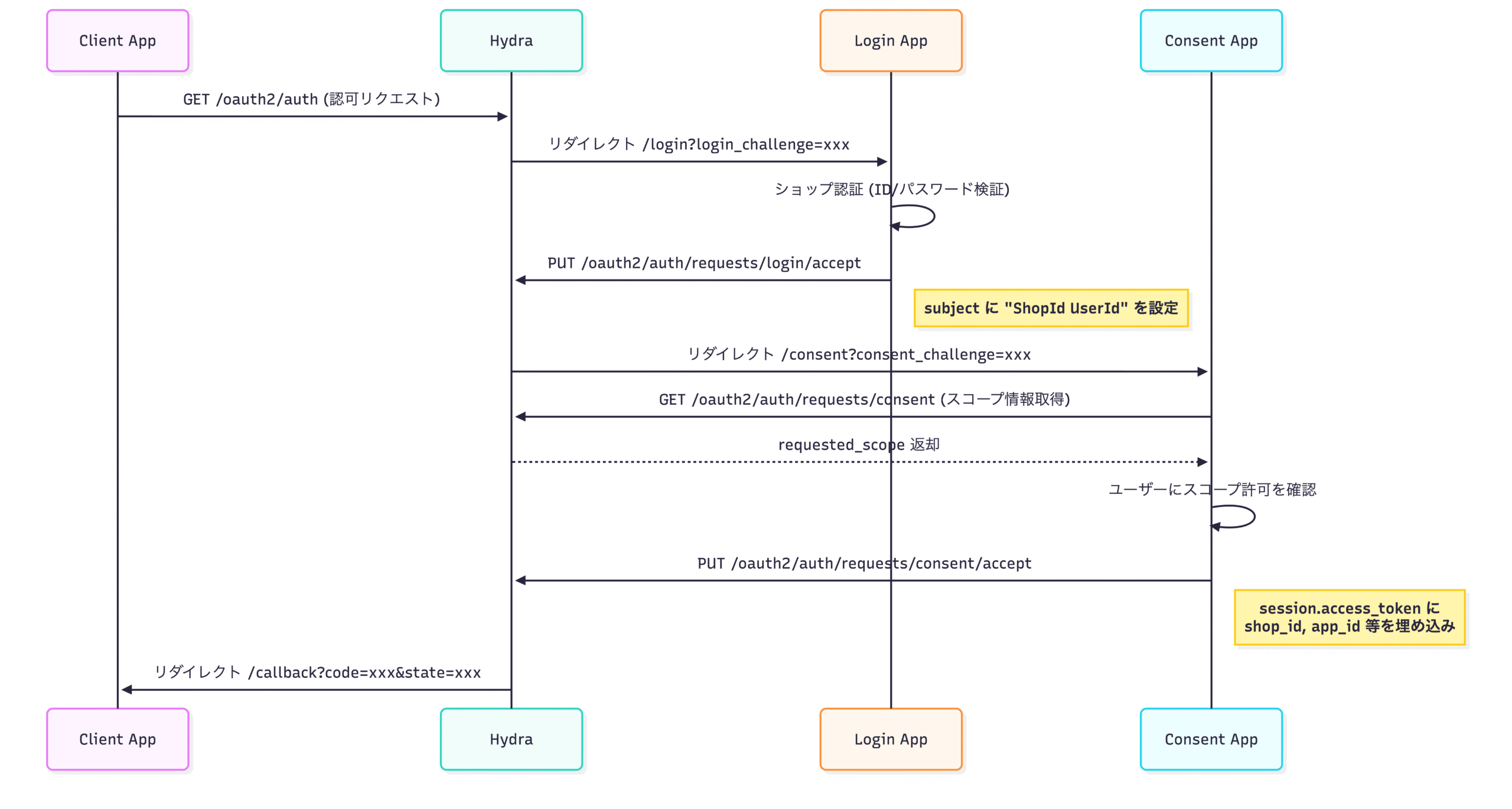
Hydra はこのフローにおける「3」と「4」を完璧にこなしますが、「2」のログイン画面と同意画面については、皆さんが作成した 「Identity Provider (IdP) Bridge」 と通信することで実現します。
3.ORY Hydra のアーキテクチャ
3.1 コンポーネント構成(Public / Admin / Login&Consent / DB)
Hydra を “最小の現実構成” に落とすとこうです:

-
Public API(通常 :4444): インターネット向け(Authorize/Token/Discovery 等)
-
Admin API(通常 :4445): 内部向け(Login/Consent の accept、クライアント管理等)
-
Login/Consent App: 自前で実装する(または hydra-login-consent-node 等をベースにする)
-
DB: Hydra は基本的に DB を唯一の状態として持つ(トークン/フロー/クライアントなど)
- Client (RP): リライングパーティ(APIクライアント)。redirect_uriでトークン受領
3.2 Login/Consent 統合の核心:Challenge ベースのフロー
Hydra の統合が「難しそう」に見える理由の 8 割はここです。
Hydra は /oauth2/auth に来た要求をそのまま処理せず、
-
login_challenge -
consent_challenge

この設計の良さは:
-
Public API をインターネットに晒しつつ
-
認証 UI は完全に自由(既存基盤に寄せられる)
-
Admin API は内部ネットワークに閉じて安全にできる
という「責務分離」と「境界設計」が、構造として強制される点です。
という ワンタイムのチャレンジを発行して外部 UI にリダイレクトし、外部 UI が Admin API で accept して戻す、という往復を行います。
4.3 セキュリティや拡張性の設計ポイント
-
Admin API を絶対に公開しない(Ingress/Service を分ける、NetworkPolicy、mTLS 等)
-
Login/Consent App で扱うセッションは“あなたの認証基盤の責務”。Hydra の remember/skip は補助だが、過信しない(prompt/max_age 等で制御が絡む)
-
監査・追跡のために、ログ/トレース/メトリクスを最初から設計に入れる
-
高スループット要件なら、アクセス・トークンの戦略(opaque vs jwt)や DB 負荷を評価する(JWT を「stateless」にして DB 書き込みを減らす発想もある)
-
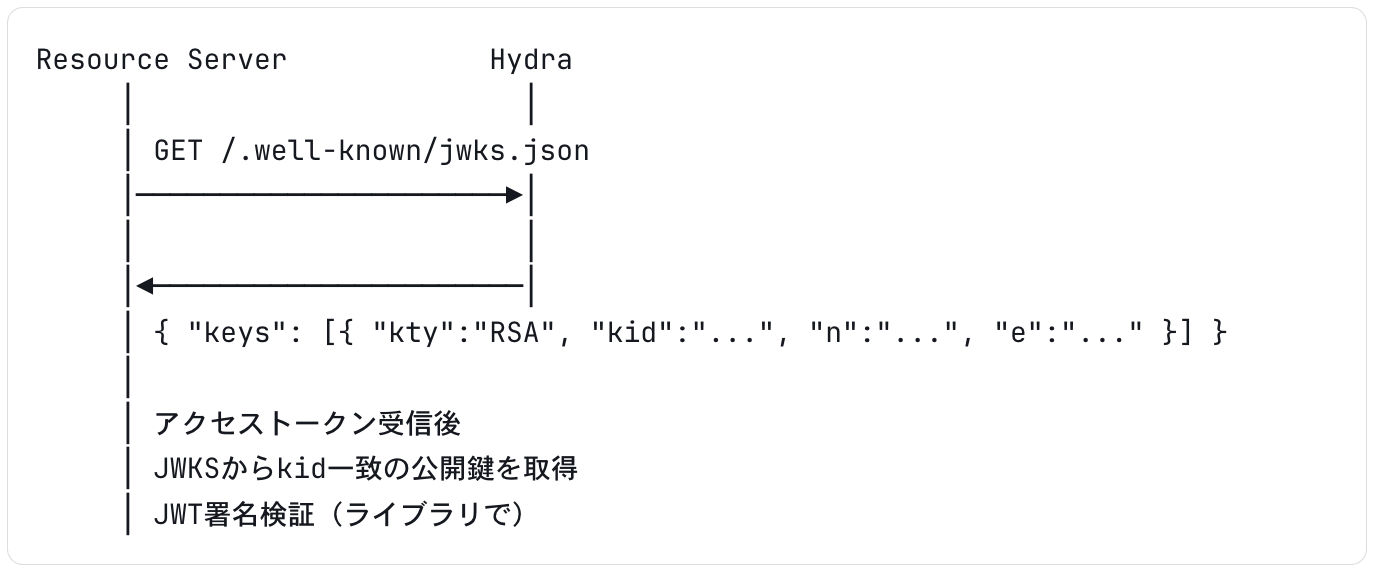
HydraはRS256またはES256でJWTに署名します。鍵はデータベースに保存され、`/.well-known/jwks.json` エンドポイントで公開鍵を公開します。リソースサーバーはこのエンドポイントから公開鍵を取得してトークンを検証する
-
Hydraは PKCE を強制する設定が可能です。SPAやモバイルアプリでは必須
# PKCE フロー
# 1. code_verifier の生成(クライアント)
code_verifier = base64url(random(32bytes))
code_challenge = base64url(sha256(code_verifier))

# 2. 認可リクエスト(code_challenge を含める)
GET /oauth2/auth
  ?client_id=my-client
  &response_type=code
  &code_challenge=CODE_CHALLENGE
  &code_challenge_method=S256
  &redirect_uri=https://app.example.com/callback
  &scope=openid email
  &state=random-state

# 3. トークンリクエスト(code_verifier を含める)
POST /oauth2/token
  grant_type=authorization_code
  &code=AUTH_CODE
  &code_verifier=CODE_VERIFIER
  &redirect_uri=https://app.example.com/callback
5.実際に Hydra を動かしてみる(ハンズオン)
私は参加してるECサイトプラットフォーム案件でHydraを導入した実績がありますので、
それをベースにして、最小限の構築を実演します。
5.1 環境構築(Docker Compose)
# docker-compose.yml
version: "3.7"
services:
# ── 認可サーバー ──
hydra:
image: oryd/hydra:v2.1.1
ports:
- "4444:4444" # Public API
- "4445:4445" # Admin API
command: serve -c /etc/config/hydra/hydra.yml all --dev
volumes:
- ./hydra:/etc/config/hydra
environment:
- DSN=mysql://hydra:secret@tcp(db:3306)/hydra?parseTime=true
depends_on:
- hydra-migrate
networks:
- common_link


# ── DBマイグレーション ──
hydra-migrate:
image: oryd/hydra:v2.1.1
environment:
- DSN=mysql://hydra:secret@tcp(db:3306)/hydra?parseTime=true
command: migrate -c /etc/config/hydra/hydra.yml sql -e --yes
volumes:
- ./hydra:/etc/config/hydra
networks:
- common_link


# ── MySQL ──
db:
image: mysql:8.0.29
command: mysqld --character-set-server=utf8mb4 --collation-server=utf8mb4_unicode_ci
environment:
- MYSQL_ROOT_PASSWORD=secret
- MYSQL_DATABASE=hydra
- MYSQL_USER=hydra
- MYSQL_PASSWORD=secret
ports:
- "3310:3306"
networks:
- common_link


networks:
common_link:
external: true
# 1. Docker ネットワーク作成(初回のみ)
docker network create common_link


# 2. コンテナ起動
docker-compose up -d


# 3. 起動確認
curl http://localhost:4444/.well-known/openid-configuration | jq .
5.2 OAuth2 クライアント登録
# Hydra CLI でクライアントを登録
docker-compose exec hydra \
hydra create client \
--endpointhttp://127.0.0.1:4445\
--id YamatoCsvExport \
--secretsample-app-secret\
--grant-types authorization_code,refresh_token,client_credentials \
--response-typestoken,code,id_token\
--scope openid,offline,product_read,product_write,order_read,order_write \
--callbackshttp://127.0.0.1:5000/callback
docker-compose exec hydra \
hydra list clients --endpoint http://127.0.0.1:4445


# 特定クライアントの詳細
docker-compose exec hydra \
hydra get client YamatoCsvExport --endpoint http://127.0.0.1:4445
5.3 認可コードフローの実演
// PKCE の code_verifier / code_challenge を生成
verifierBytes := make([]byte, 96)
rand.Read(verifierBytes)
codeVerifier := base64.RawURLEncoding.EncodeToString(verifierBytes)
h := sha256.Sum256([]byte(codeVerifier))
codeChallenge := base64.RawURLEncoding.EncodeToString(h[:])

query := url.Values{
    "client_id":             {"YamatoCsvExport"},
    "response_type":         {"code"},
    "scope":                 {"openid offline order_read order_write product_read product_write"},
    "max_age":               {"0"},
    "redirect_uri":          {"http://127.0.0.1:5000/callback"},
    "state":                 {uuid.New().String()},  // CSRF 防止
    "nonce":                 {uuid.New().String()},  // リプレイ攻撃防止
    "code_challenge":        {codeChallenge},        // PKCE
    "code_challenge_method": {"S256"},
}
authURL := "http://127.0.0.1:4444/oauth2/auth?" + query.Encode()
http://127.0.0.1:4444/oauth2/auth
?client_id=YamatoCsvExport
&response_type=code
&scope=openid%20offline%20order_read%20product_read
&redirect_uri=http://127.0.0.1:5000/callback
&state=550e8400-e29b-41d4-a716-446655440000
&nonce=6ba7b810-9dad-11d1-80b4-00c04fd430c8
&code_challenge=E9Melhoa2OwvFrEMTJguCHaoeK1t8URWbuGJSstw-cM
&code_challenge_method=S256
func loginHandler(w http.ResponseWriter, r *http.Request) {
ifr.Method == http.MethodGet {
challenge := r.URL.Query().Get("login_challenge")
renderLoginForm(w, challenge)
return
}


// POST: 認証処理
r.ParseForm()
email := r.FormValue("email")
password := r.FormValue("password")
challenge := r.FormValue("challenge")


// ショップ認証(実装は各環境に依存)
shopID, userID := authenticateShop(email, password)


// Hydra Admin API: accept login
// subject に "ShopId UserId" をスペース区切りで設定
body, _ := json.Marshal(map[string]interface{}{
"subject": fmt.Sprintf("%s%s", shopID, userID),
"remember": true,
"remember_for": 3600,
})
url := fmt.Sprintf("%s/oauth2/auth/requests/login/accept?login_challenge=%s",
hydraAdminURL, challenge)
req, _ := http.NewRequest(http.MethodPut, url, bytes.NewReader(body))
req.Header.Set("Content-Type", "application/json")


resp, _ := http.DefaultClient.Do(req)
deferresp.Body.Close()


varresultmap[string]string
json.NewDecoder(resp.Body).Decode(&result)
http.Redirect(w, r, result["redirect_to"], http.StatusFound)
}
func consentHandler(w http.ResponseWriter, r *http.Request) {
ifr.Method == http.MethodGet {
challenge := r.URL.Query().Get("consent_challenge")
// Hydra Admin API: スコープ情報取得
url := fmt.Sprintf("%s/oauth2/auth/requests/consent?consent_challenge=%s",
hydraAdminURL, challenge)
resp, _ := http.Get(url)
deferresp.Body.Close()


varconsentInfomap[string]interface{}
json.NewDecoder(resp.Body).Decode(&consentInfo)
// requested_scope をユーザーに表示
renderConsentForm(w, challenge, consentInfo["requested_scope"])
return
}


// POST: スコープ許可
r.ParseForm()
challenge := r.FormValue("challenge")
grantScope := r.Form["grant_scope"]


// subject からテナント情報を取得(login で設定した値)
url := fmt.Sprintf("%s/oauth2/auth/requests/consent?consent_challenge=%s",
hydraAdminURL, challenge)
resp, _ := http.Get(url)
deferresp.Body.Close()


varconsentInfomap[string]interface{}
json.NewDecoder(resp.Body).Decode(&consentInfo)


subject := consentInfo["subject"].(string)
parts := strings.SplitN(subject, " ", 2)
shopID := parts[0]
userID := parts[0]
iflen(parts) > 1 {
userID = parts[1]
}
clientID := consentInfo["client"].(map[string]interface{})["client_id"].(string)


// Hydra Admin API: accept consent
// session.access_token に設定した値が Introspection の ext フィールドに返却される
body, _ := json.Marshal(map[string]interface{}{
"grant_scope": grantScope,
"session": map[string]interface{}{
"access_token": map[string]interface{}{
"shop_id": shopID,
"user_id": userID,
"app_id": getAppID(clientID),
"client_id": clientID,
"is_member": false,
},
},
})
acceptURL := fmt.Sprintf("%s/oauth2/auth/requests/consent/accept?consent_challenge=%s",
hydraAdminURL, challenge)
req, _ := http.NewRequest(http.MethodPut, acceptURL, bytes.NewReader(body))
req.Header.Set("Content-Type", "application/json")


acceptResp, _ := http.DefaultClient.Do(req)
deferacceptResp.Body.Close()


varresultmap[string]string
json.NewDecoder(acceptResp.Body).Decode(&result)
http.Redirect(w, r, result["redirect_to"], http.StatusFound)
}
func callbackHandler(w http.ResponseWriter, r *http.Request) {
// state 検証(CSRF 対策)
savedState := getSessionValue(r, "state")
ifsavedState != r.URL.Query().Get("state") {
http.Error(w, "state が不正です", http.StatusBadRequest)
return
}


// エラーチェック
iferrParam := r.URL.Query().Get("error"); errParam != "" {
http.Error(w, "認証エラー: "+r.URL.Query().Get("error_description"), http.StatusBadRequest)
return
}


// 認可コードを取得 → Step 3 でトークンに交換
code := r.URL.Query().Get("code")
_ = code// → トークン取得処理へ(Step 3 参照)
}
# コールバックで受け取った認可コードをトークンに交換
data = {
"client_id": "YamatoCsvExport",
"grant_type": "authorization_code",
"code": request.args.get("code"),
"redirect_uri": "http://127.0.0.1:5000/callback",
"code_verifier": session["code_verifier"], # PKCE 検証
}
response = requests.post(
"http://hydra:4444/oauth2/token",
data=data,
auth=HTTPBasicAuth("YamatoCsvExport", "sample-app-secret")
)
token = response.json()
{
"access_token": "ory_at_...",
"token_type": "bearer",
"expires_in": 3600,
"refresh_token": "ory_rt_...",
"id_token": "eyJhbGciOiJSUzI1NiIs...",
"scope": "openid offline order_read product_read"
}
// JWKS から公開鍵を取得
jwksResp, _ := http.Get("http://hydra:4444/.well-known/jwks.json")
defer jwksResp.Body.Close()

var jwks struct {
    Keys []map[string]interface{} `json:"keys"`
}
json.NewDecoder(jwksResp.Body).Decode(&jwks)

// ID Token をデコード・検証
idToken := token["id_token"].(string)
parts := strings.Split(idToken, ".")
payloadBytes, _ := base64.RawURLEncoding.DecodeString(parts[1])
var payload map[string]interface{}
json.Unmarshal(payloadBytes, &payload)

// nonce を検証(リプレイ攻撃防止)
if session.Nonce != payload["nonce"].(string) {
    http.Error(w, "nonce が不正です", http.StatusBadRequest)
    return
}
// リフレッシュトークンによるトークン更新
formData := url.Values{
    "client_id":     {"YamatoCsvExport"},
    "grant_type":    {"refresh_token"},
    "refresh_token": {token["refresh_token"].(string)},
}
req, _ := http.NewRequest(http.MethodPost, "http://hydra:4444/oauth2/token",
    strings.NewReader(formData.Encode()))
req.Header.Set("Content-Type", "application/x-www-form-urlencoded")
req.SetBasicAuth("YamatoCsvExport", "sample-app-secret")

resp, _ := http.DefaultClient.Do(req)
defer resp.Body.Close()

var newToken map[string]interface{}
json.NewDecoder(resp.Body).Decode(&newToken)
formData := url.Values{"token": {accessToken}}
resp, _ := http.PostForm("http://hydra:4445/oauth2/introspect", formData)
defer resp.Body.Close()

var introspection HydraAccessToken
json.NewDecoder(resp.Body).Decode(&introspection)
// {
//   "active": true,
//   "scope": "order_read product_read",
//   "client_id": "YamatoCsvExport",
//   "sub": "xxx",
//   "exp": 1700000000,
//   "ext": { "shop_id": "xxx", "app_id": 1 }
// }
6.よくある課題と対策
6.1 トークンのライフサイクル管理
実務で詰まるのはここです。
-
Refresh Token の失効戦略(ローテーション、盗難対策)
-
Access Token の戦略(opaque / jwt)と検証方法(introspection or 検証キー配布)
-
「誰がいつ何を許可したか」の追跡(同意の再取得、prompt=consent 等)
Hydra は Token Introspection などの標準仕様も扱えますが、Resource Server 側の設計とセットで決まります。
高トラフィックでは、JWT(stateless)で DB 書き込みを減らす発想が出ますが、鍵管理・失効・監査とのトレードオフを必ず評価してください。
6.2 ログの可観測性、監査ログ
最低限おすすめ:
-
Public と Admin を別々にメトリクス・ログ集約(境界が事故りやすい)
-
Login/Consent App 側も合わせて 分散トレーシング(どこで遅い/落ちるかは“往復”で起きる)
-
認可イベント(同意、refresh 発行、introspection、revocation)の監査要件を最初に確認
-
「いつ、誰が、どのクライアントに、どの scope を許可したか」
-
「どの IP / UA から発行されたか」
-
「失効はいつ、誰が行ったか」
-
Hydra 単体だけで完結しないので、Login/Consent App と Resource Server 側のログ設計まで含めて統一するのが重要です。
6.3 マルチテナント対応
Hydra を「テナントごとに完全分離」するか、「単一 Hydra にテナント概念を載せる」かで難易度が変わります。
-
強分離(推奨されやすい)
-
テナントごとに Hydra/DB を分ける(運用は重いが安全・監査が楽)
-
-
論理分離
-
client_id の名前空間、login/consent の UI でテナントを識別し分岐
-
設定/鍵/監査の分離要件が強いと破綻しやすい
-
Kubernetes だと「Namespace 単位で Hydra + DB + Secret を分離」する設計が現実的です。
7.まとめ
ORY Hydra は、OAuth2 / OIDC の複雑さを抽象化しつつ、開発者に最大限の自由度(ユーザー管理の自由)を提供してくれる強力なツールです。
-
「認証」は既存の資産を使い、「認可」だけをプロフェッショナルに任せたい。
-
パフォーマンスとセキュリティの仕様準拠を両立したい。
このようなニーズがある場合、Hydra は間違いなく最良の選択肢の一つとなるでしょう。
次世代システム研究室では、アプリケーション開発や設計を行うアーキテクトを募集しています。アプリケーション開発者の方、次世代システム研究室にご興味を持って頂ける方がいらっしゃいましたら、ぜひ 募集職種一覧 からご応募をお願いします。
皆さんのご応募をお待ちしています。



グループ研究開発本部の最新情報をTwitterで配信中です。ぜひフォローください。
Follow @GMO_RD





